
CuntWin casino uses an Australian mobile number and password to authenticate every account, with no email address required at any point. The login page is a full-screen layout — not a pop-up overlay — which makes field input comfortable on both desktop browsers and smartphone displays. Because each account is tied to a unique mobile number, access remains consistent across any device as long as the registered credentials are available.
This guide covers the complete CuntWin login sequence, how to resolve common access problems, the SMS-based password reset process and which account features require identity verification before becoming fully available.
| Detail | Information |
|---|---|
| Login method | Mobile number and password |
| Password length | 6–20 characters |
| Account identifier | Australian mobile number (e.g. 61480050689) |
| Password recovery | Forgot Password — SMS code to registered number |
| Registration name requirement | Must match bank account name exactly |
| Multi-device access | Supported — same credentials on any browser or device |
| Login page type | Full-screen layout (not a pop-up) |
| Recommended browsers | Chrome, Safari, Firefox (latest versions) |
| Support if login fails | Live chat — bottom navigation bar, available around the clock |
How to log in to CuntWin casino
The CuntWin login page opens from the LOGIN button visible in the right column of the homepage alongside the Register button and balance display. On mobile, the same button appears in the equivalent position within the scaled layout. During our session on a MacBook Air running Chrome, the login page loaded as a full-screen purple-themed layout within one second of clicking LOGIN.
- Go to cuntwin.com and click or tap the LOGIN button
- The login page opens as a full-screen layout with two input fields
- Enter the registered Australian mobile number in the Mobile No / Username field — example format: 61480050689
- Enter the account password in the Password field — between 6 and 20 characters
- Press the red LOGIN button to submit
- The account panel loads with balance, bonus status, game catalogue access and transaction history
Players without an account see a REGISTER button and a "Do Not Have An Account Yet?" prompt below the login form. The Forgot Password link sits below the Register button and initiates the SMS-based recovery flow without leaving the login page.
What the CuntWin login page looks like
The login screen uses the same deep purple background and gold accent theme as the main lobby. The CuntWin logo with witch-hat icon appears at the top centre of the page. Two white input fields — Mobile No / Username and Password — sit stacked above the full-width red LOGIN button. Below the button, the prompts for Register and Forgot Password are clearly separated and accessible with a single tap or click.
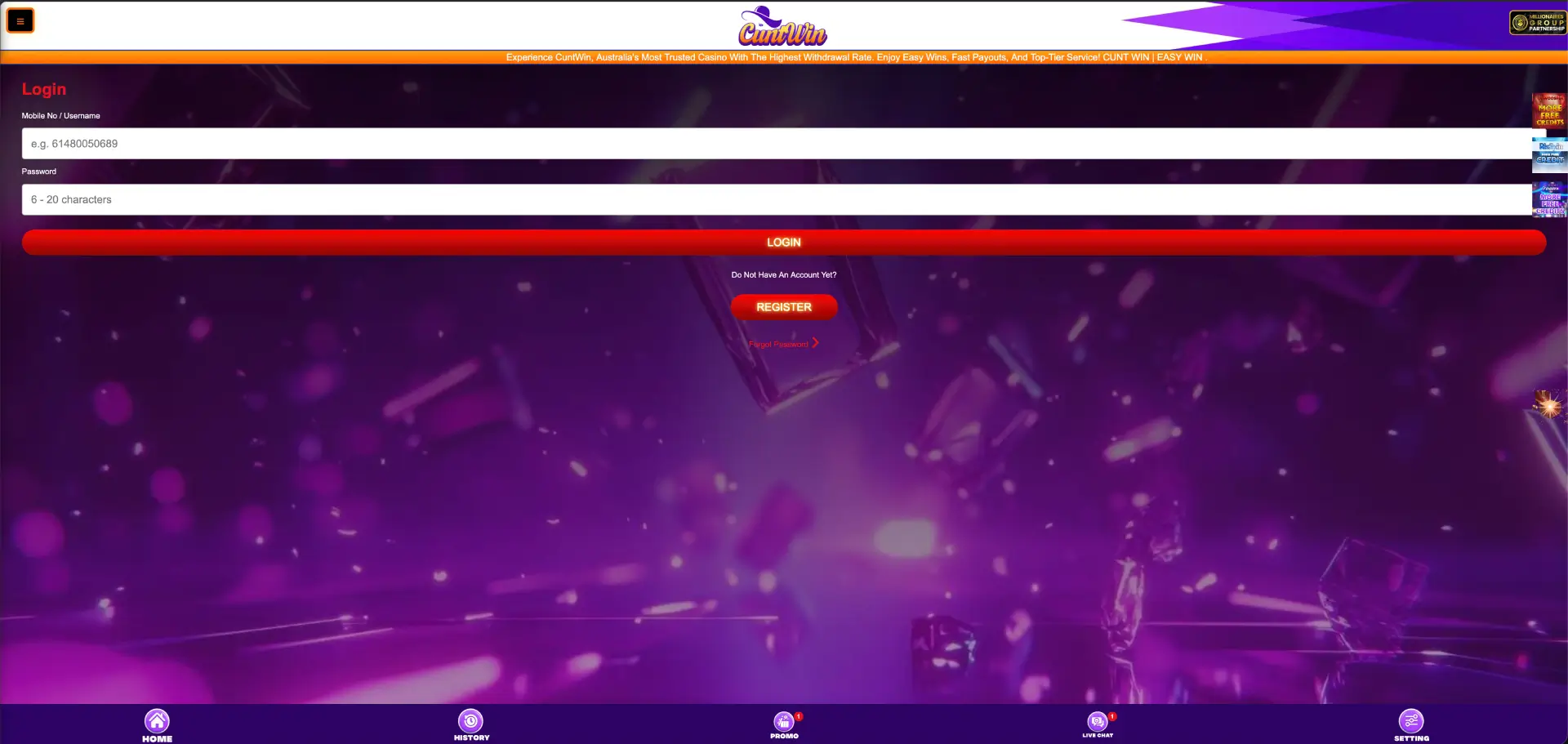
No email field, country dropdown or CAPTCHA element appears on the form. The Mobile No field uses a placeholder in Australian format (e.g. 61480050689) to guide input. The Password field placeholder reads "6 – 20 characters." During our test on an iPhone 14 running Safari, both fields responded immediately to tap input and the keyboard appeared without any delay before the LOGIN button became active.
Fixing CuntWin login problems
Most access failures at CuntWin result from a small number of causes that each have a direct resolution. The table below covers the most common scenarios and the steps to fix them without needing to contact support.
| Problem | Likely cause | Fix |
|---|---|---|
| Login rejected immediately | Incorrect phone number or password | Re-enter credentials manually — avoid auto-fill |
| Password field shows wrong characters | Caps lock active or auto-fill conflict | Clear the field, disable caps lock, type manually |
| Login page fails to load | Browser cache or outdated browser version | Clear cache, update browser, switch to Chrome or Safari |
| Account temporarily restricted | Multiple consecutive failed login attempts | Wait a few minutes, then use Forgot Password |
| SMS reset code not received | Network delay or inactive SIM | Check signal strength, confirm number, request code again |
How to reset the CuntWin login password
The Forgot Password option on the login page initiates an SMS-based reset that sends a verification code to the registered mobile number. The original password is not required to complete the reset, and the process takes under two minutes provided the phone number is active and receiving messages.
- Open the CuntWin login page at cuntwin.com
- Click or tap Forgot Password below the Register button
- Enter the registered Australian mobile number when prompted
- Request the SMS reset code
- Enter the code received by SMS into the verification field
- Set a new password between 6 and 20 characters
- Confirm the new password and submit
- Return to the login page and sign in with the updated credentials
If the reset SMS does not arrive within a few minutes, confirming the correct number was entered and checking for network signal resolves most cases. Players who have changed their mobile number since registration and no longer have access to the original SIM should contact live chat for manual account recovery. The chat icon in the bottom navigation bar is available around the clock.
Registration and the name requirement
Players creating a new account at CuntWin encounter one requirement that sets the platform apart from similar mobile-number-based casinos: the full name entered at registration must match the bank account name exactly. This note appears in red text directly below the Full Name field during registration and applies to all payment method verifications that follow.
This means a player registered as "James T. Walker" cannot use a bank account held under "James Walker" without creating a discrepancy that may delay withdrawal processing. Getting the name right at registration avoids this issue entirely. Players who need to correct a name after registration should contact live chat before making a withdrawal attempt.
Logging in across multiple devices
CuntWin account access is credential-based rather than device-bound. The same mobile number and password work across any browser on any smartphone, tablet or desktop. During our session, we verified access on both a Samsung S23 and a MacBook Air using the same account simultaneously — both instances showed the correct balance and active bonus status without conflict.
Switching from desktop to mobile requires no additional steps. The session resumes at the current account state, including any active bonuses or pending claims on the Promo page. Players who upgrade to a new phone retain access immediately using the same credentials on the new device.
Browser and device compatibility
The CuntWin login page performed without issues across Chrome on Android, Safari on iOS and Chrome on desktop during our testing. Fields rendered correctly, input keyboards appeared immediately on mobile and the LOGIN button submitted without delay on all three configurations. The page uses the full-screen layout on both desktop and mobile, which means there is no overlay to dismiss or resize — the login environment fills the entire viewport on every device type.
Outdated browser versions may cause the login page to load slowly or fail to trigger the SMS prompt during registration. Updating Chrome or Safari to the current version and clearing the browser cache resolves these cases in the majority of instances.
Security during CuntWin login
All login submissions at CuntWin use encrypted connections across both the desktop and mobile layouts. The SMS-based recovery system means that resetting a password requires physical access to the registered mobile device — a layer of protection beyond the password alone. Repeated incorrect login attempts trigger a temporary access slowdown on the account as a standard safeguard against automated attempts.
To maintain consistent and secure access to the CuntWin casino login:
- Store the password in a secure location rather than relying solely on browser auto-save
- Keep the registered Australian mobile number active and associated with the account at all times
- Avoid submitting login credentials over public or shared Wi-Fi networks
- Clear the browser cache if the login page behaves unexpectedly between sessions
- Use the Forgot Password flow as soon as credentials are lost rather than making repeated failed attempts
FAQ
How do I log in to CuntWin casino?
Navigate to cuntwin.com, click the LOGIN button, enter the registered Australian mobile number and password, then press the red LOGIN button. The account panel loads immediately after successful authentication.
What is the password format for CuntWin login?
Passwords must be between 6 and 20 characters. This applies during both initial registration and password resets. The requirement is shown as a placeholder in the Password field on both the login and registration pages.
What do I do if my CuntWin casino login is not working?
Check that the mobile number entered matches the one used during registration. Clear the password field and re-enter the credential manually without auto-fill. If the page fails to load, clear the browser cache and try again. For repeated failed attempts, use Forgot Password to reset via SMS.
Why does my name need to match my bank account at CuntWin?
CuntWin requires the full name entered at registration to match the bank account name used for payments. This is a payment verification requirement stated in red on the registration form. A mismatch between the registered name and the payment method name can delay withdrawal processing until the discrepancy is resolved through live chat.
Can I log in to CuntWin on multiple devices?
Yes. The same mobile number and password work on any browser across any device. Balance, bonus status and transaction history are consistent across all sessions regardless of which device is used to log in.
How long does the CuntWin password reset take?
The SMS-based password reset typically completes in under two minutes from requesting the code to setting a new password. The code arrives via SMS to the registered mobile number. If it does not arrive within a few minutes, check signal strength, confirm the number entered is correct and request the code again.
What if I no longer have access to my registered mobile number?
The Forgot Password SMS flow cannot be completed without access to the original SIM. Players who have changed their number should contact the 24/7 live chat support through the bottom navigation bar to begin a manual account recovery process before attempting any withdrawals.